
POS & ERP integrations
Connect your POS to every shelf label
Our cloud reads the prices you already manage in your POS or ERP and keeps every label in every store in sync. No new system to learn, no change to your checkout.
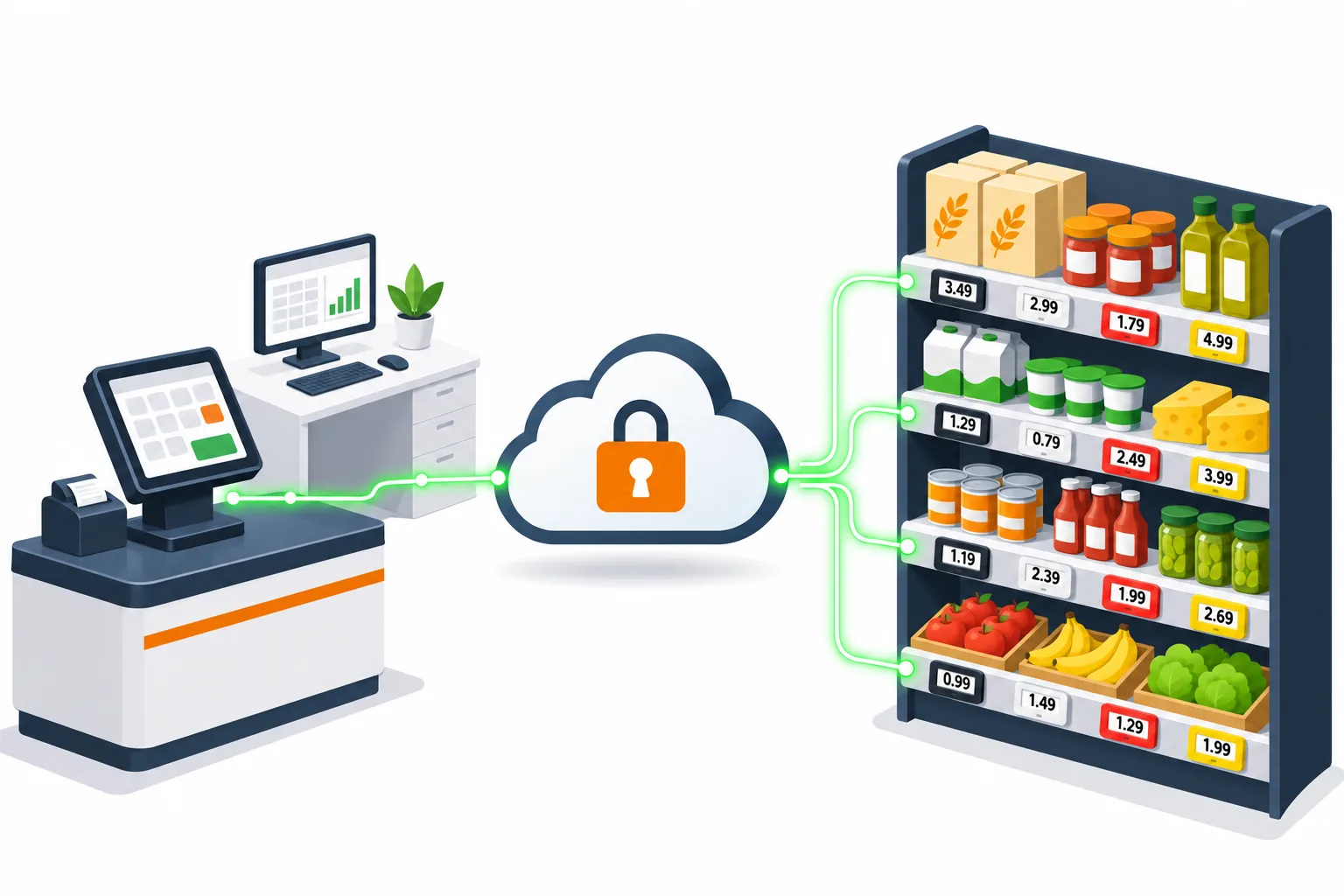
How it works
ESLs don’t replace your POS or ERP. They show the prices those systems already produce.
Your POS or ERP
Keeps the master prices and products, exactly as today.
Our cloud
Reads the data, applies your label templates and schedules updates.
Every label
Shows the new price in seconds, in every store, with every change logged.
Choose how your data reaches us
Pick the method that matches how your system already shares data.
REST API push
Your POS or ERP sends each price change to our API as it happens.
Best for: Cloud POS systems with webhooks, or any system your team can connect to a REST endpoint.
Updates in secondsScheduled CSV / SFTP
Your system drops a daily or hourly CSV file on a secure SFTP server we provide.
Best for: On-premises POS systems, ERPs with nightly exports, stores without IT staff.
Hourly or dailyUpload in the web app
Upload an Excel or CSV file in the cloud platform. No engineering needed.
Best for: Pilots, single stores and stores that manage prices by hand.
Whenever you uploadLive in a few days
Our cloud runs the sync for you. Here is how we set it up.
Scoping call
A free 20–30 minute call to confirm which system holds your prices and how it shares data.
Secure API link
We create a secured link for you to send us your API keys or connection details, so they never sit in a plain email.
Data mapping
We match your fields (SKU, barcode, name, price, promo price, unit) to the label templates.
Test aisle
We sync a small set of labels so you can check shelf against register before the full rollout.
Go live
Our cloud keeps every label in sync, in real time or on a schedule, and logs every price change.
Read-only access. We only read product and price data. We never access card payments or customer records.
Supported POS and ERP systems
Our status labels are conservative: “Confirm with us” means we have not yet run that integration for a US customer in production. Most modern POS systems can export a CSV, which is enough to start.
What data the platform needs
The same small set of fields per product, whichever method you use.
Required
- SKU or product IDmatches each label to its product
- Barcode (UPC, EAN or GTIN)for QR lookups and re-pairing
- Product namewhat the label shows
- Regular pricethe price on the shelf
- Unit of measurefor example per lb or per oz
Optional
- Sale or promo priceswitches the label to a promo template
- Categorygroups templates by department
- Stock, ratings, custom fieldsany field your system exposes can appear on a label
Industry notes
Cannabis dispensaries
Labels read product data from your dispensary POS (Dutchie, Treez, Flowhub, BLAZE, Cova, Greenbits, Meadow and others), which already reconciles with Metrc. THC content, strain and batch ID flow through as standard fields.
Pharmacies
The platform syncs from your pharmacy management system, such as McKesson EnterpriseRx, ScriptPro, Computer-Rx or RxOne. The NDC works as the SKU, and every update is logged for price-accuracy audits.
Integration FAQ
How long does an integration take?
Most setups take a few days from the scoping call to live labels.
Do we need to change our POS?
No. Your POS or ERP stays exactly as it is. Our cloud reads the product and price data it already produces.
Do you access payment or customer data?
No. We only read product and price data. We never access card payments or customer records.
How do we share our API keys safely?
We create a secured link for you to send us your API keys or connection details, so they never sit in a plain email.
What if our system is not on the list?
That usually just means a short scoping call. Most modern POS systems can export a CSV, which is enough to start. Scoping is free.
Confirm your system works with ZKONG ESLs
Tell us which POS or ERP you run. We will confirm a known integration path or scope a custom one, usually in a single call, with no obligation.
Request integration scoping